The AI assistant
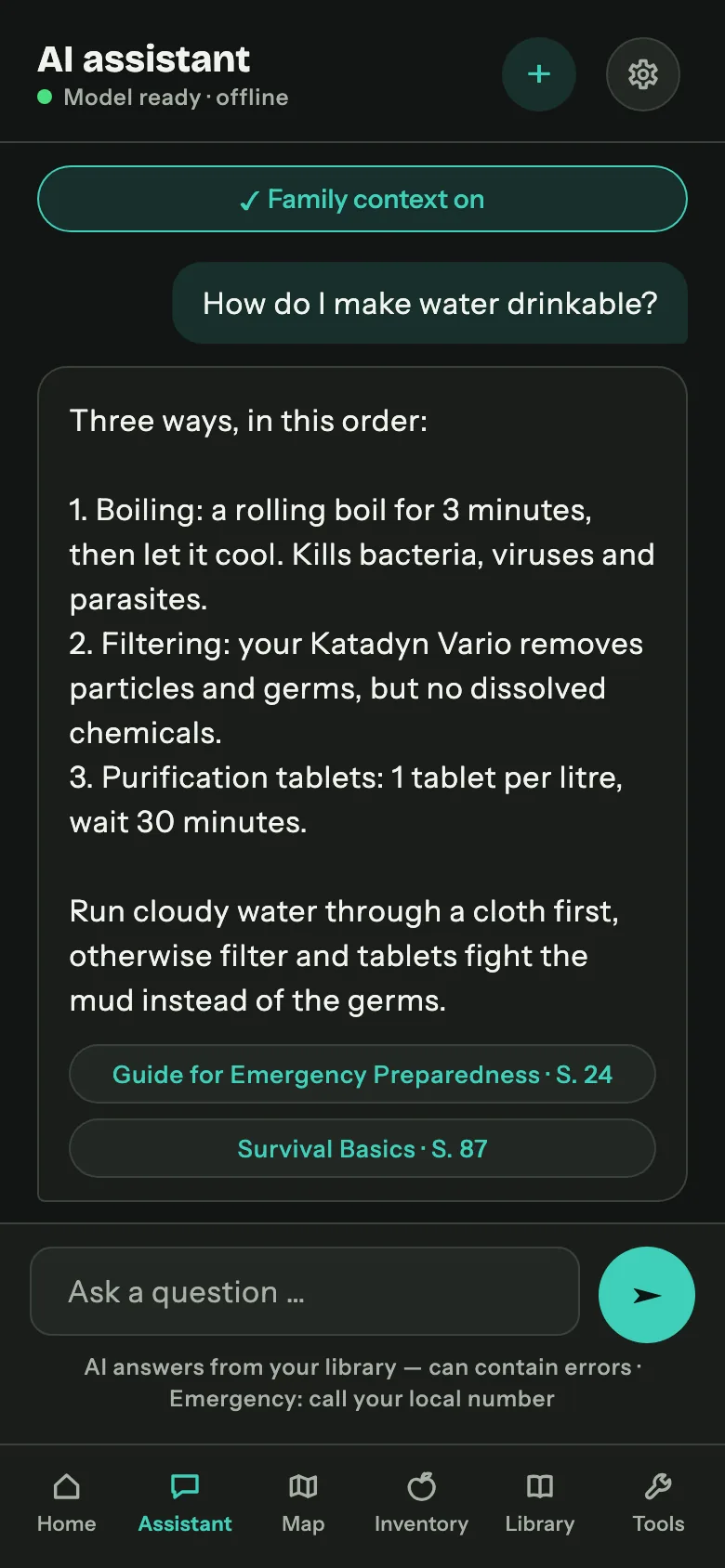
A chat that answers from documents you control, with a language model that runs on your own hardware. Nothing is sent anywhere: not the question, not the retrieved passage, not the answer.
Answers with a source, not a vibe
Every answer carries chips underneath it: document name and page. Tapping one opens the PDF at that exact page. If the documents do not cover your question, the assistant says so instead of inventing something, which for a first-aid question is the only acceptable behaviour.
Streaming, short, in plain language
Answers appear word by word as they are generated, so you can start reading immediately. They are deliberately short: steps, quantities, warnings. Long essays are not useful when you are holding a torch.
Foreign-language documents work
A German question against an English handbook returns a German answer. There is no translation step and no language pack. The retrieval is calibrated per language pair, and the prompt forbids the model from drifting into the language of the source. Imperial units are converted to metric with the original in brackets, because a mis-read gallon is a safety problem, not a cosmetic one.
Household context, when you want it
The assistant can take your medical cards into account ("does grandma's allergy matter here?"), and you can switch that context off per session. Medical answers always carry a static disclaimer.
It also knows the app
The handbook you are reading on this website ships inside the app as an indexed document. Asking "how do I book out half a pack?" gets the same treatment as a survival question: a short answer with a citation.
Library and your own documents
The library is the pile of knowledge the assistant is allowed to use.
- Import PDF, TXT and Markdown. Text is extracted, cleaned, split into sections and indexed. A 100-page PDF takes a few minutes once, then never again.
- PDF viewer with page jump. Reading the original is always one tap away.
- Language badge per document, detected automatically.
- Covers from page one, so a shelf of PDFs is recognisable at a glance.
- Honest errors. A scanned book without a text layer cannot be indexed. Keepilo says exactly that, in one sentence, instead of failing quietly.
- Re-index and delete, with a confirmation, because deleting a book you spent an evening importing should require a second of thought.
Keepilo does not ship copyrighted books. It points you at freely downloadable handbooks and lets you import them yourself, and it handles anything else you own the same way.
Inventory: food, water, medication, consumables
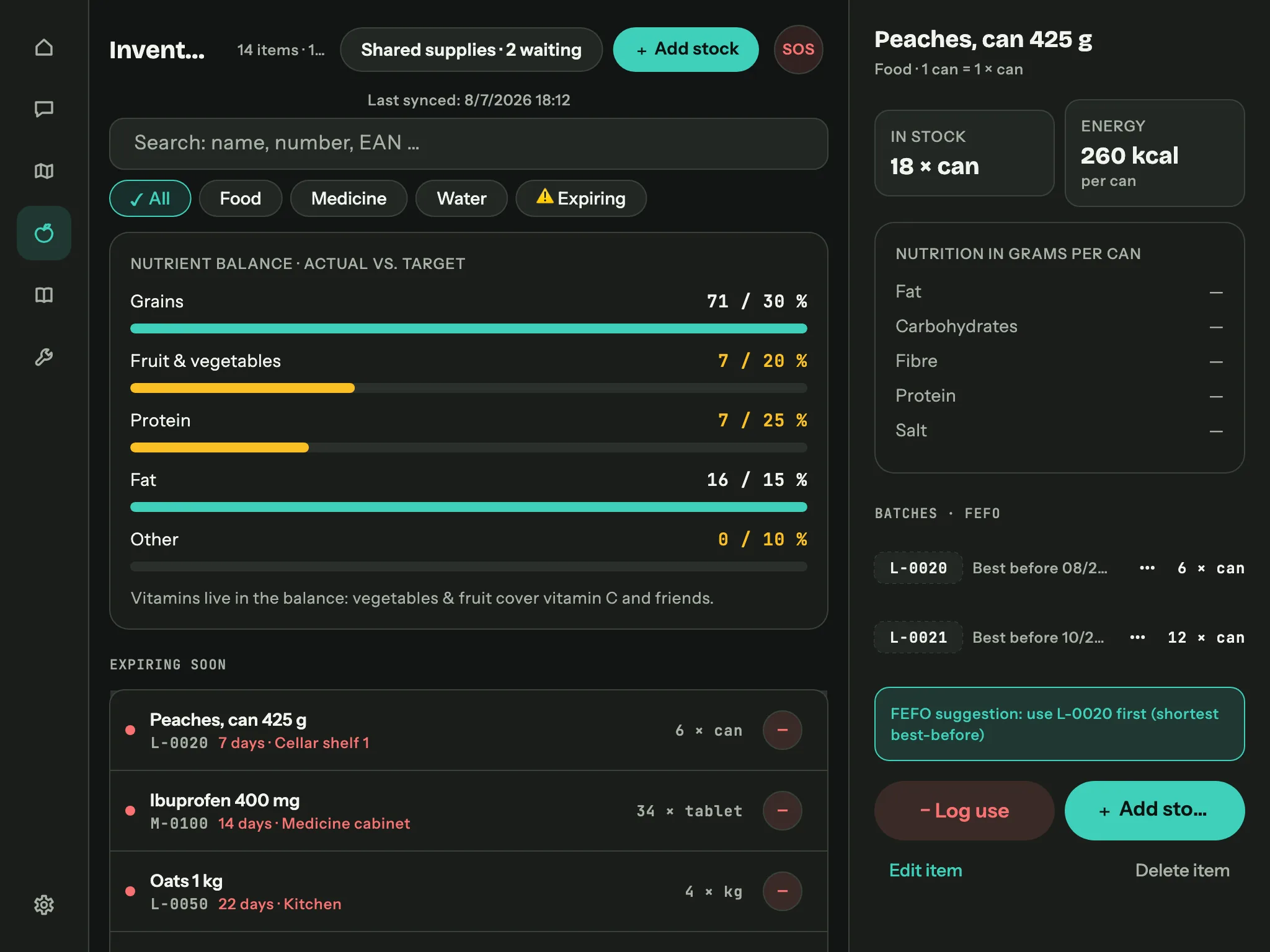
Booking in
A wizard, not a form wall: name, quantity, unit, best-before date, storage location.
Barcode scanning on phones fills in what it can. Every article gets an inventory number
(L-0042 for food, M-0007 for medication, W-0003 for
water, S-0003 for special items) that you can write on the crate with a marker
and search for later.
Batches and expiry
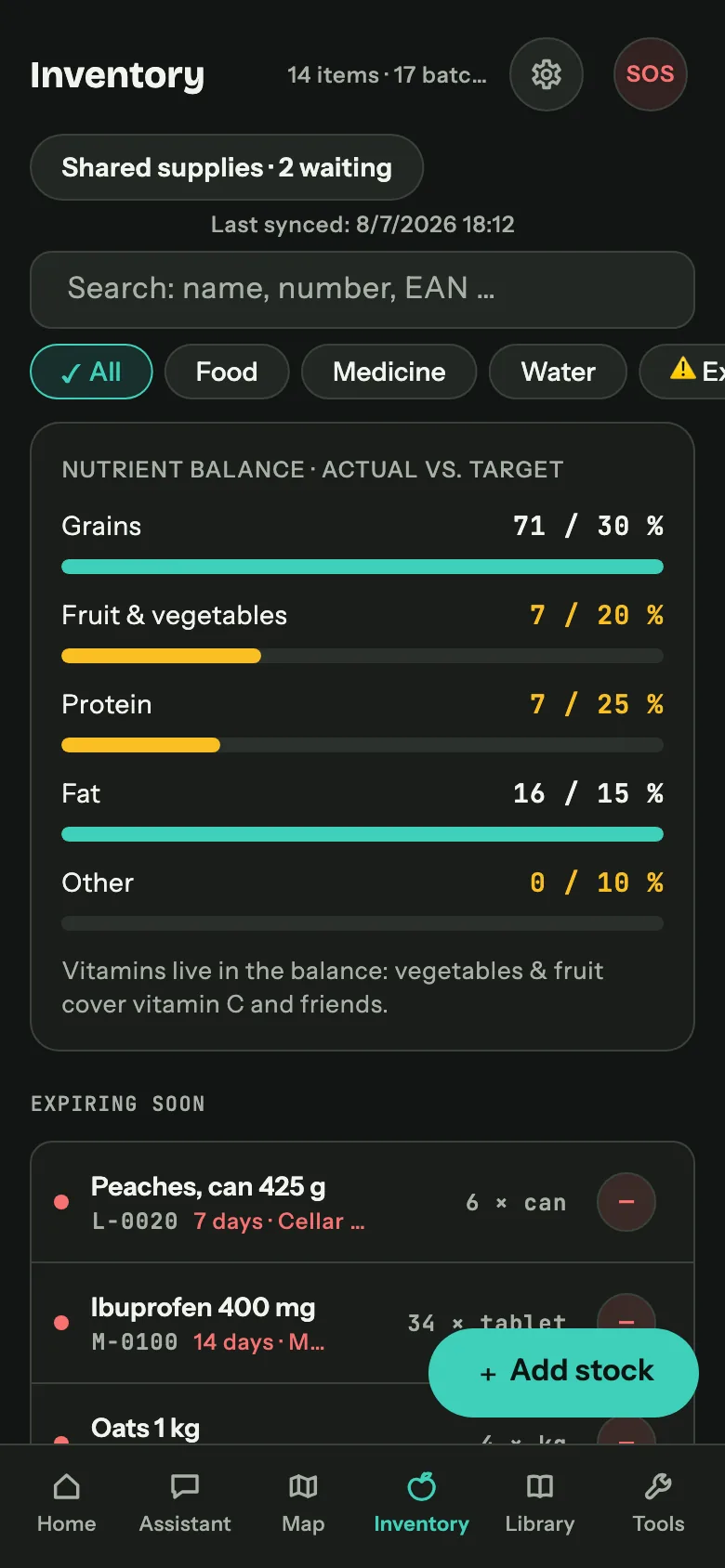
Identical goods with different best-before dates stay separate batches. The list shows a traffic light per item, groups what expires soon at the top, and the detail panel lists every batch with its date and location.
Booking out, including half a pack
Take out whole packs, partial quantities or the rest of a batch, with a reason (used, expired, given away, lost). Keepilo proposes the batch with the shortest date first, FEFO or first expired first out, because otherwise the oldest tin lives forever.
Special items with a real range
A water filter is not measured in pieces but in litres, a toilet bag in days, batteries in packs. Keepilo tracks capacity per model, measures the actual daily rate from your usage log and reports the range in days. Filter and purification tablet capacity counts as potential drinking water in the water calculation.
Nutrition and nutrient balance
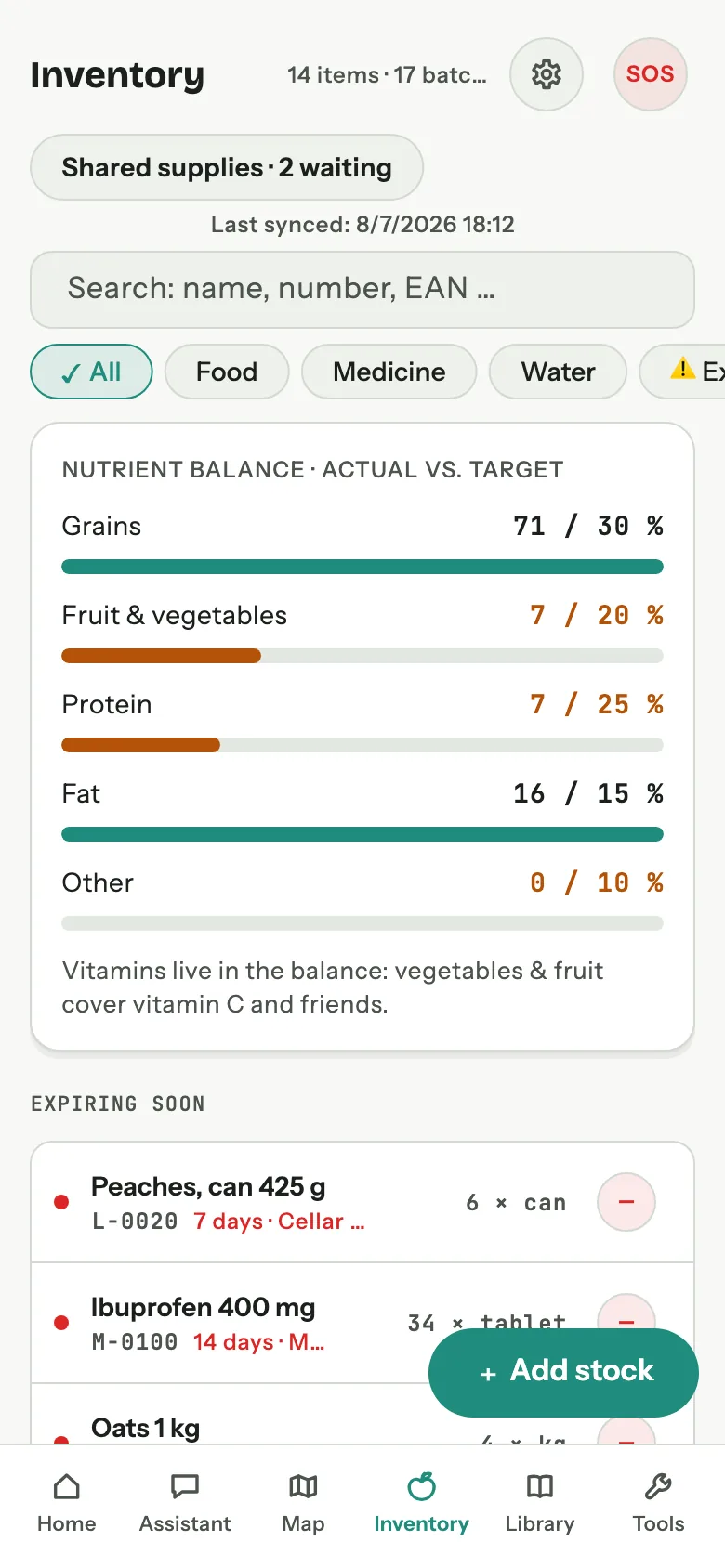
All six figures from the back of the pack, per article: energy, fat, carbohydrates, fibre, protein, salt. The barcode scan pre-fills what it knows, the rest can be entered by hand, and the fill quantity converts per-100-g values to your actual pack. Together they produce the balance above the stock list: actual versus target share for grain, vegetables and fruit, protein and fat, plus the share of calories from protein (10 to 15 percent as the reference range) and a vitamin note when vegetables and fruit are missing entirely. It sits where the shelf sits that it describes, and it catches the classic stockpile mistake: five months of pasta, eleven days of anything else.
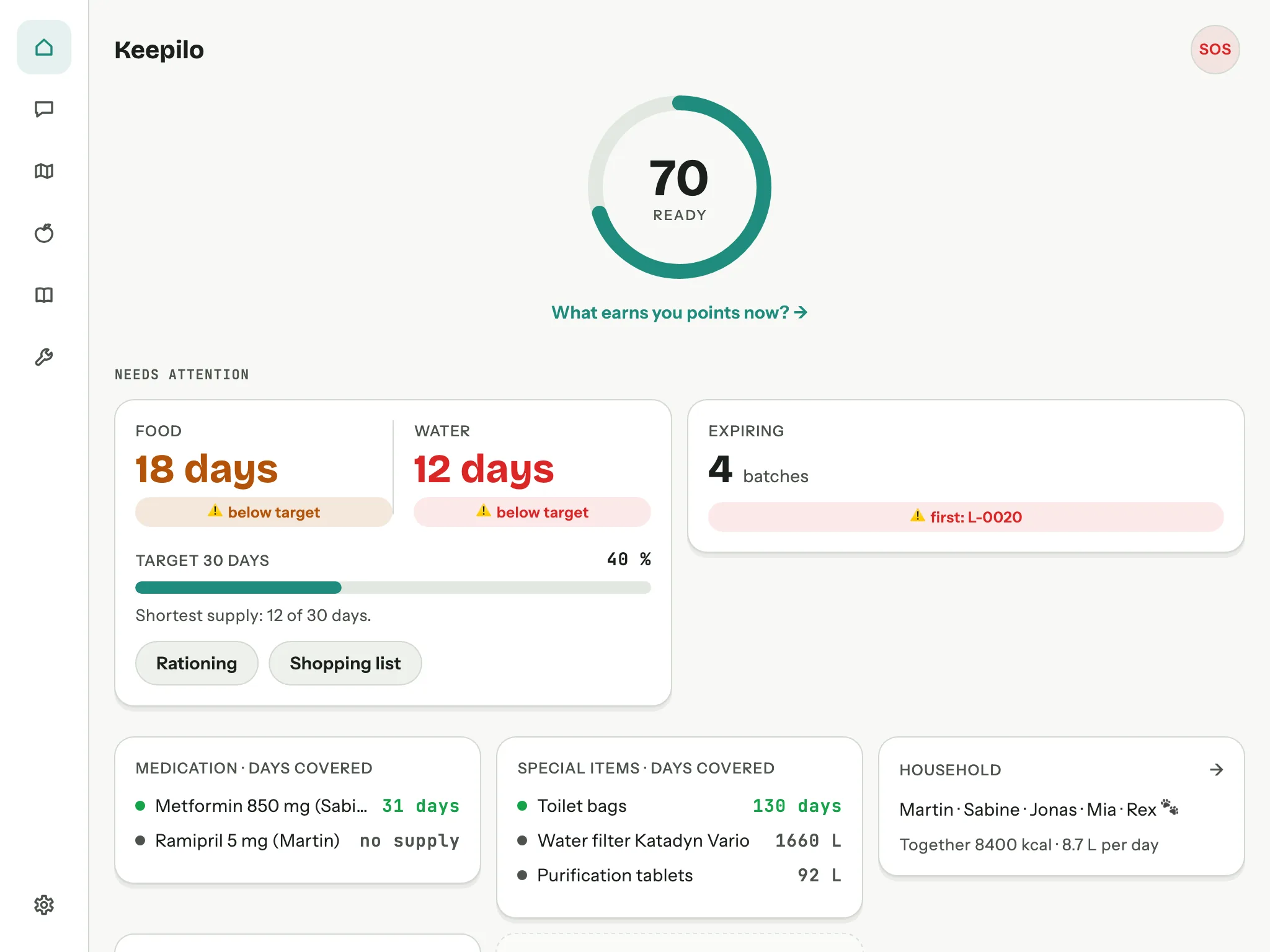
Dashboard: how long would we last?
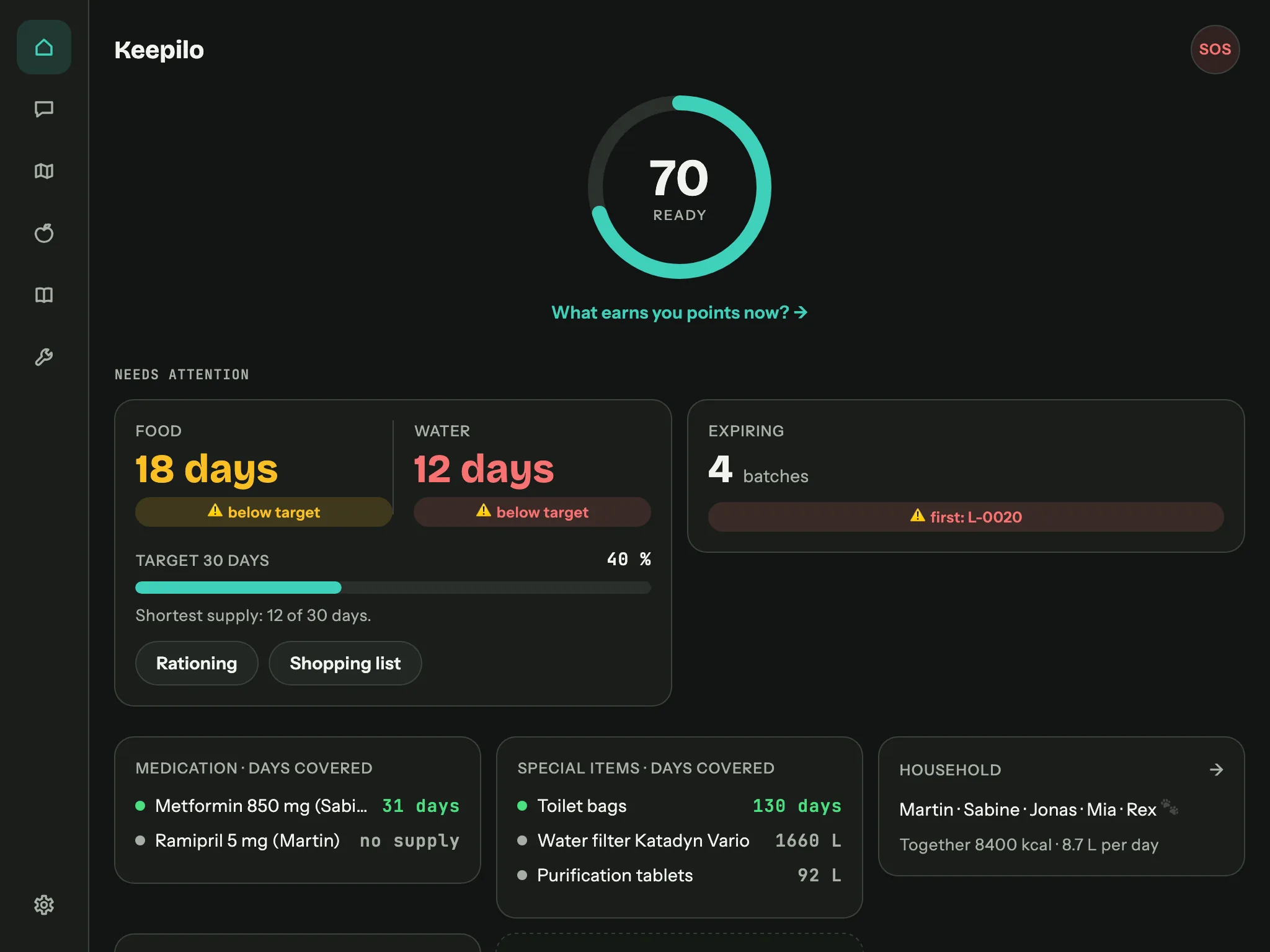
- Household with requirement profiles. Daily calorie and water requirement per age group and sex, with a per-person override when someone eats more, is pregnant or is an athlete. Every value shows where it came from: your override, the profile, or the general reference figure.
- Range in days for food and water, against your household, with a traffic light against the target you set (14 days, 30 days, whatever you decided).
- Expiring soon, with the batch that goes first named directly.
- Medication range per person, computed from the dosage in the medical card and the stock in the inventory. This is the number that quietly matters most.
- Readiness score with one suggestion at a time: the single next thing that would improve your situation most.
- Preparation tile: the state of emergency plan, backpack checklist and emergency cards as "3 of 21 done" with a bar; one tap leads straight in.
- Local notifications: a weekly check and threshold alerts, scheduled on the device without a background service and without a push server.
Offline map: whole countries on your device
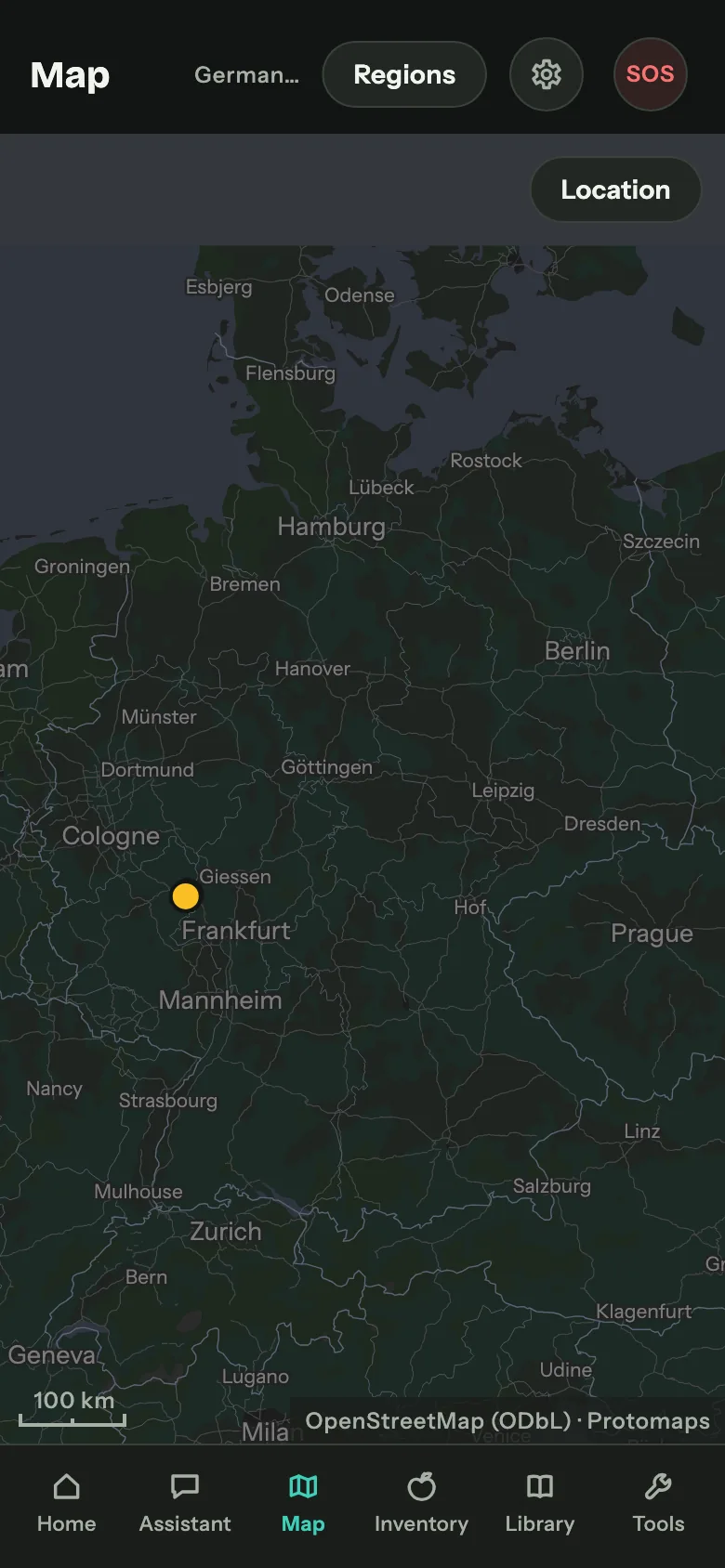
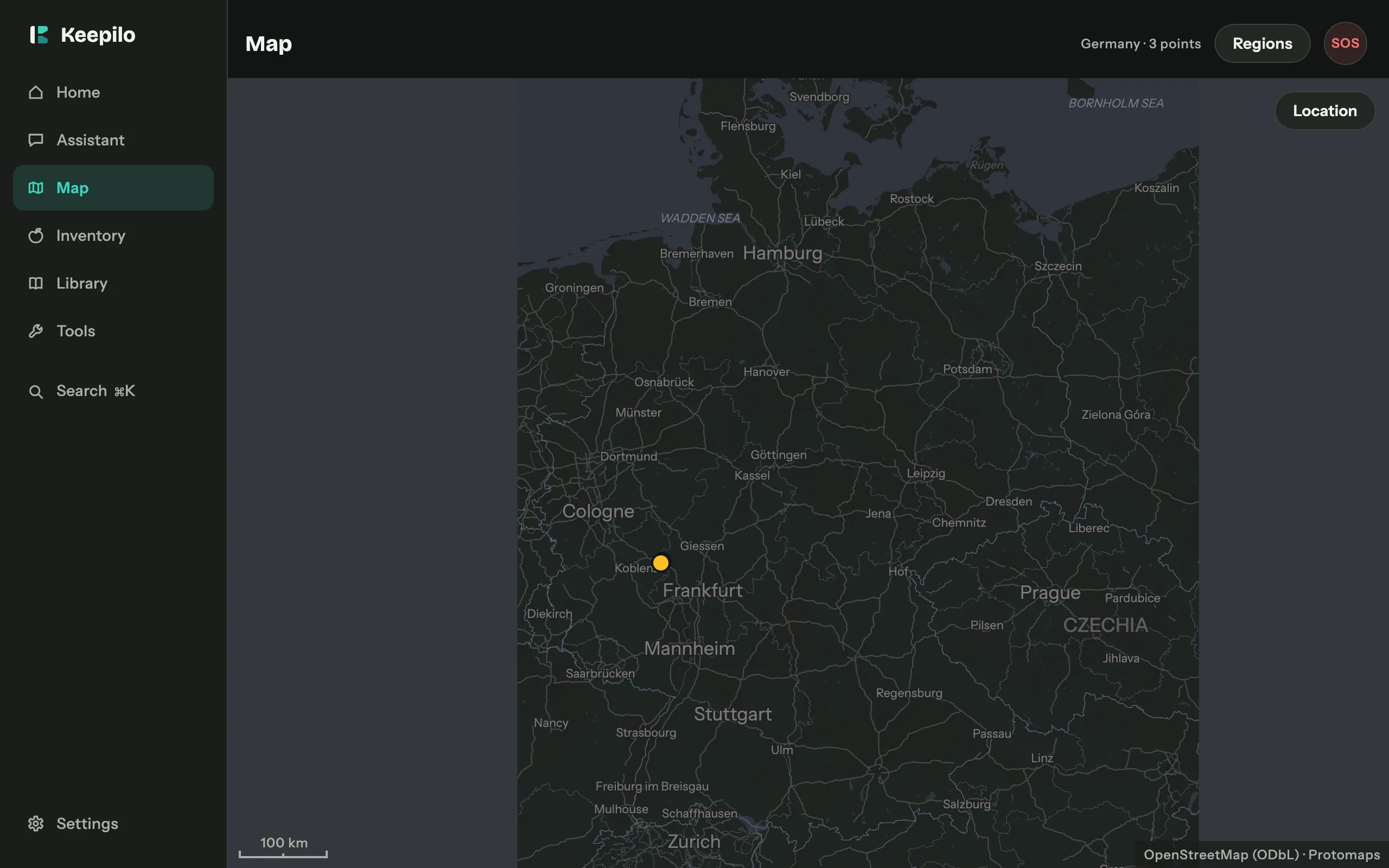
A map helps most precisely when the network is gone. Keepilo downloads complete countries onto your device and then draws everything from that one file: roads, places, water, contour lines and labels in your language. No map service, no background fetching, no counter running somewhere.
- Regions by country instead of a radius. People plan in countries, not in radii. The catalogue covers Europe completely and reaches beyond it; the file size is shown on every entry before you download.
- Several countries as one map. Germany, Austria and Switzerland lie on top of each other, not next to each other, because nobody plans along borders.
- Your own points with name, kind and note: meeting point, water, safe place, hazard, supplies. They travel to your family through export and direct transfer, and reappear in emergency mode as the meeting point.
- Track recording to find your way back, deliberately foreground only: no background location, no constant tracking, no battery question.
- Location and compass right on the map. Your device computes the position without internet; it is displayed and stored nowhere.
- On all four platforms, macOS and Windows included. Same file, same catalogue.
Map data is OpenStreetMap under the ODbL; the credit sits on the map.
Tools: ten things that still work with no network
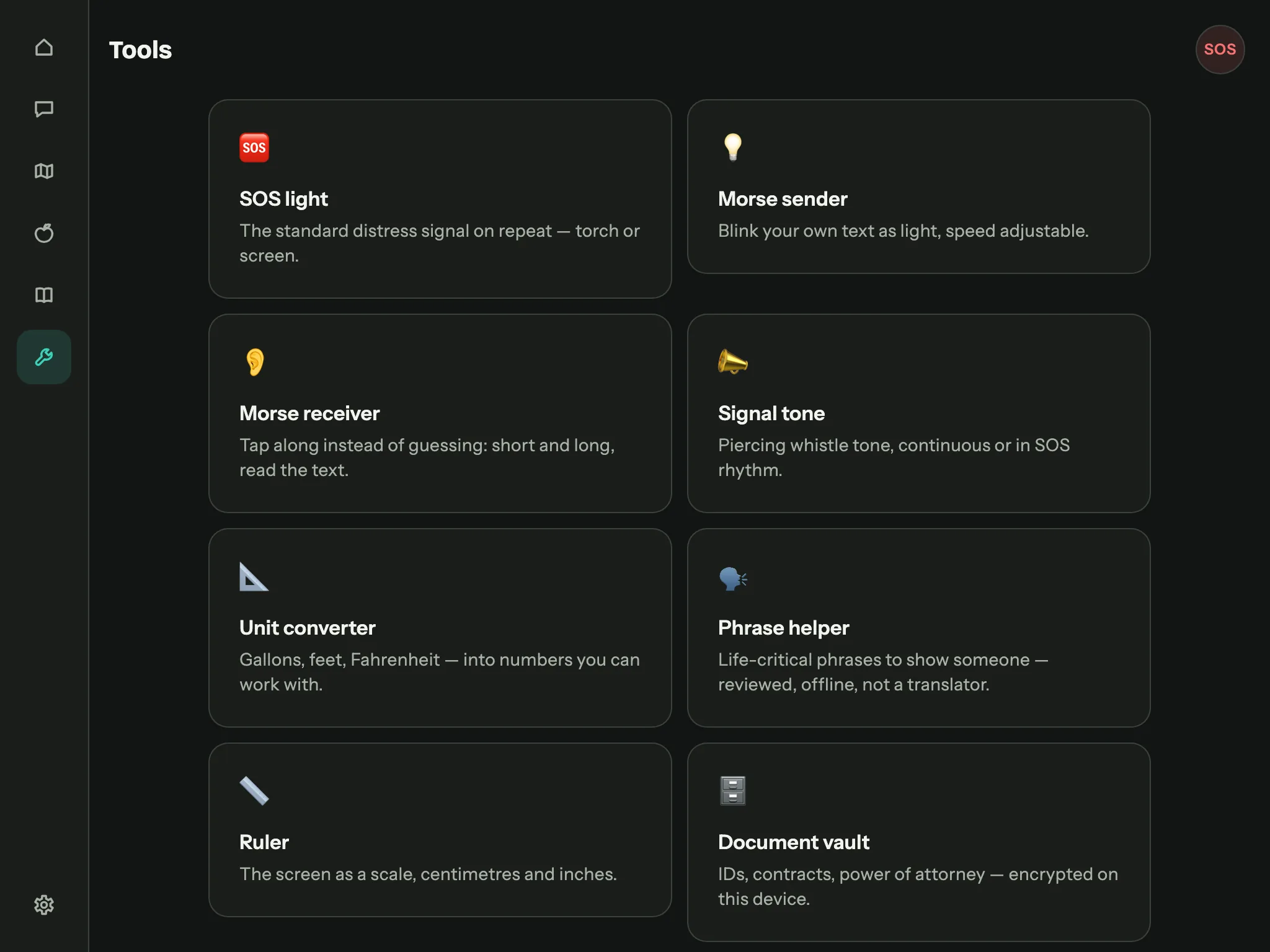
Active tools only, ones that calculate or use your device's sensors. Reference material belongs in the library, where the assistant can quote it.
| Tool | What it does |
|---|---|
| SOS light | The standard distress signal on a loop, with torch or screen. |
| Morse sender | Your own text as a light signal, three speeds, current character highlighted. |
| Morse receiver | Tap short and long, the text appears as you go. |
| Signal tone | A piercing whistle, continuous or in SOS rhythm. |
| Unit converter | Length, volume, weight, temperature. US and imperial gallons kept apart. |
| Phrase help | Vetted life-critical sentences with pronunciation. Not a translator. |
| Spirit level | Bubble plus degrees, zeroable on a sloping surface. |
| Ruler | The screen edge as a scale, calibrated against a bank card. |
| Magnifier | Camera image enlarged, with light. |
| Document vault | Encrypted storage, see below. |
The phrase help is deliberately not a translator
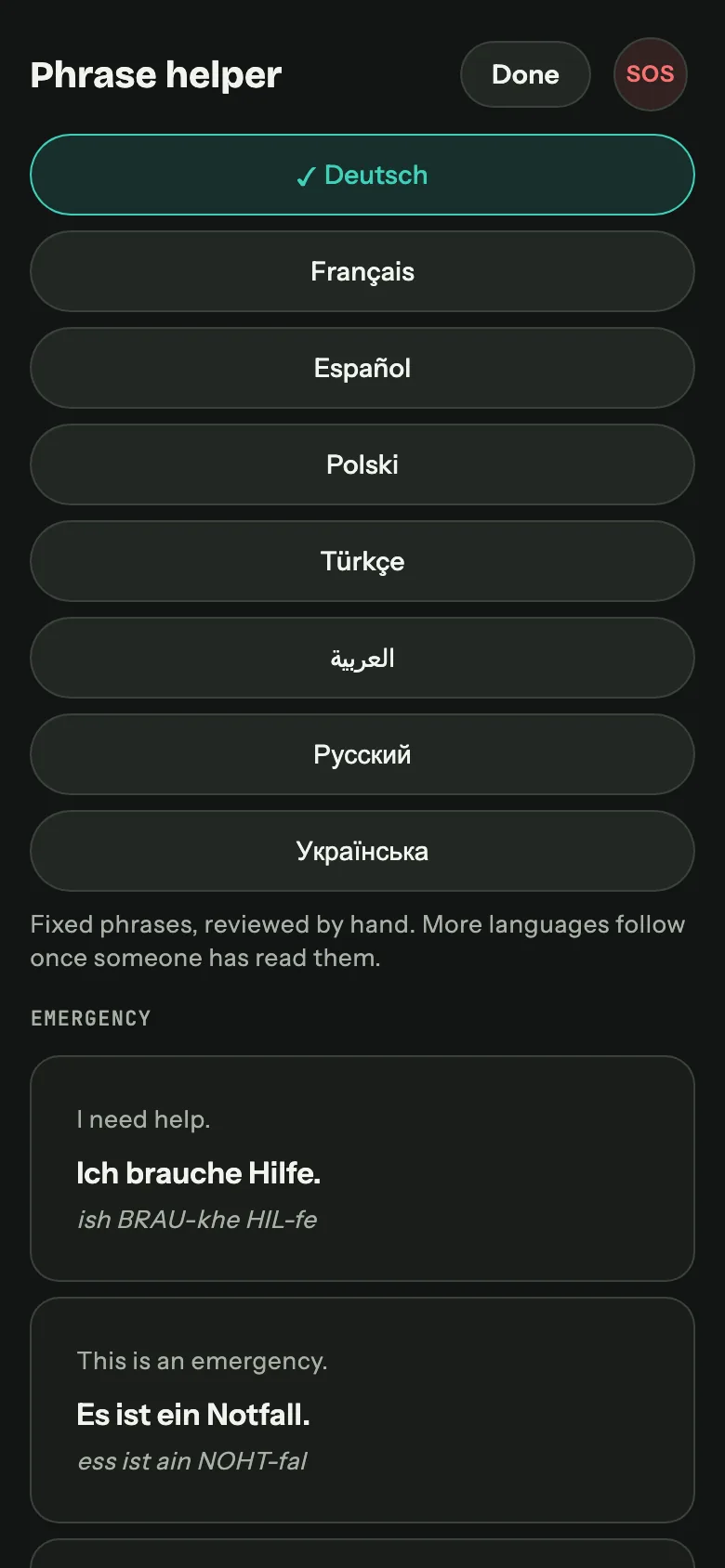
Fixed, human-checked sentences for situations that count, each with a pronunciation you can read out. You cannot type your own, and that is the point: a wrong machine translation of "no peanuts" would be more dangerous than none at all. A language only appears once a human has approved the translation.
Document vault
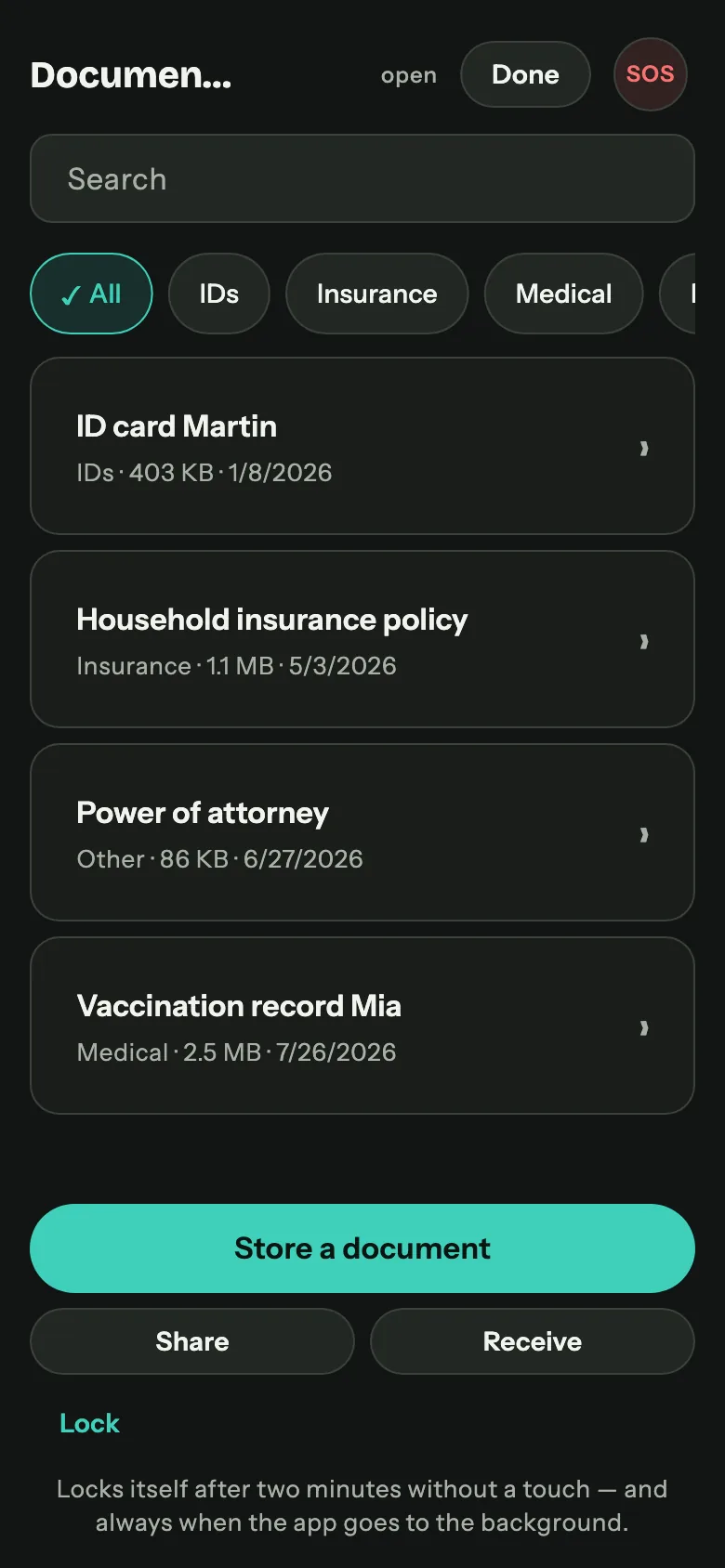
ID documents, policies, contracts, powers of attorney, vaccination records: encrypted on the device, separate from the library and invisible to the assistant.
- AES-256-GCM, key derived from your password with Argon2id. The index of documents is encrypted too: "power of attorney, mother" already says enough.
- No reset. The password is stored nowhere, not even as a hash. That is exactly why nobody else gets in.
- Locks itself after two minutes and immediately in the background. After that the list is gone, not hidden. Previews run in memory only.
- Handover code for sharing: twelve characters you read out over the phone. The file alone is useless, and on the other side everything is immediately re-encrypted with that device's own password. Your password never travels.
- Encrypted inside the backup, never in the sharing package. Handing over your stock data does not hand over your ID documents.
Rationing and shopping list
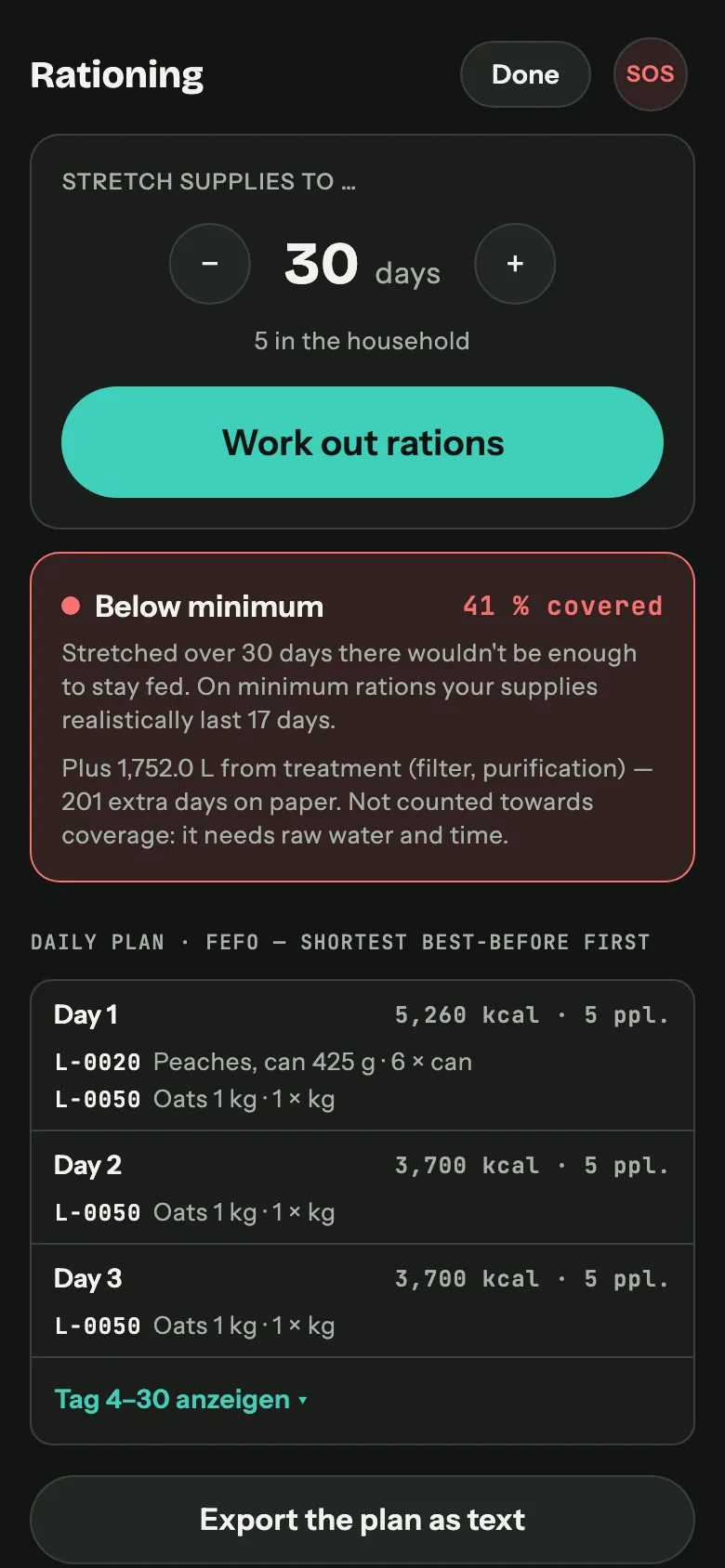
Rationing
Pick a number of days. Keepilo computes the coverage you would reach, tells you honestly if it is below 100 %, and produces a day-by-day plan that consumes the shortest-dated batches first and keeps every day within ±10 % of the same energy budget. Export as text to the clipboard or the share sheet.
Shopping list
The inverse calculation: the gap between where you are and where you want to be, in water, calories and long-term medication. The list names actual goods ("6 × UHT milk 1 L"), following the official stockpile table of the German Federal Ministry of Food and Agriculture, converted to common pack sizes. On request the assistant generates stock templates from your own books, each with book and page; the maths itself stays transparent and never comes from the AI. The list is tickable, and it shares as plain text so it survives any messenger. The reasoning behind the official quantities is covered in the post A 10-day emergency food supply.
Both hang where the number sits that they calculate from: on the range card on the home screen. There is no planner tab any more, because nobody finds three sub-pages behind a collective noun.
Emergency area
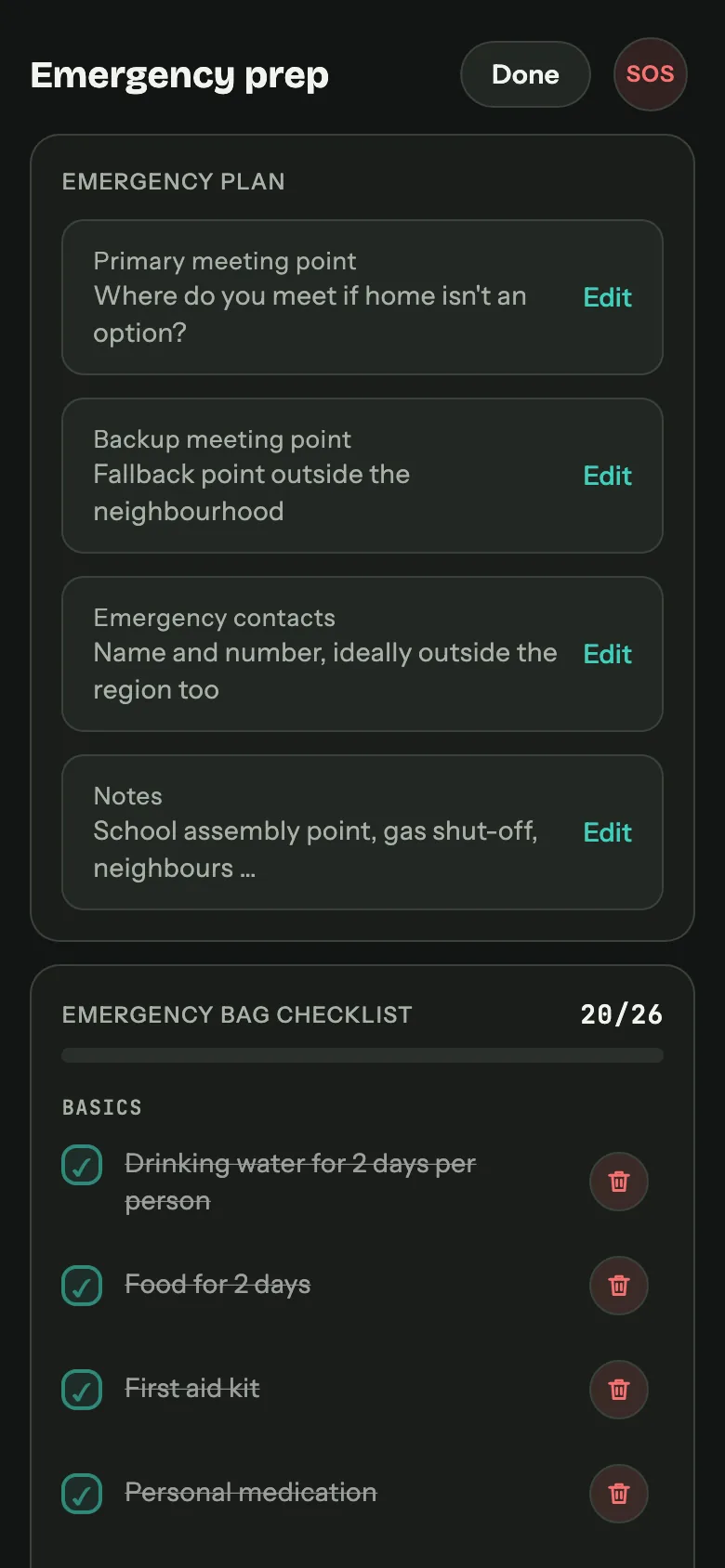
- An emergency button on every screen, red, top right, always in the same place. When it counts, your hand should find it without looking.
- Full-screen emergency mode: large type, high contrast, the essentials only: plan, contacts, medical cards, meeting point on the map.
- Notify the family via SMS, because SMS gets through when data does not.
- Emergency backpack checklist based on the recommendations of the German Federal Office of Civil Protection and Disaster Assistance (BBK), written in our own words, tickable per person, contributing to the readiness score.
- Printable emergency cards: A7 landscape, four to an A4 sheet, with cut marks and mirrored backs so double-sided printing lines up. Photo, blood type, allergies, chronic conditions, medication, emergency contact.
Medical cards
One card per person: blood type, height and weight, allergies, chronic conditions, vaccinations, long-term medication with dosage. The medication entries link to the inventory, which is what makes the range calculation possible. The card is filled in by a wizard (one question per screen, skippable, resumable) and it can be shared or printed.
This is health data under Article 9 GDPR. It lives in the same local database as everything else, is never transmitted, and the export preset that contains it asks before it does.
Security and app lock
- PIN, stored as a PBKDF2 hash in the system keychain, never in plain text.
- Biometrics: Face ID, Touch ID, fingerprint, Windows Hello.
- Auto-lock after a chosen idle time.
- Snapshot protection: the app preview in the task switcher is blurred, so a shoulder glance does not reveal the medication list.
A shared supply across the household
The everyday part: as long as there is internet, the devices in one household hold the same stock. One of you books out the can, the other sees it in the shop on their own phone. This is the convenience route, and it does not replace the offline routes in the next section, it stands beside them. The feature stays off until you start it, and costs nothing extra.
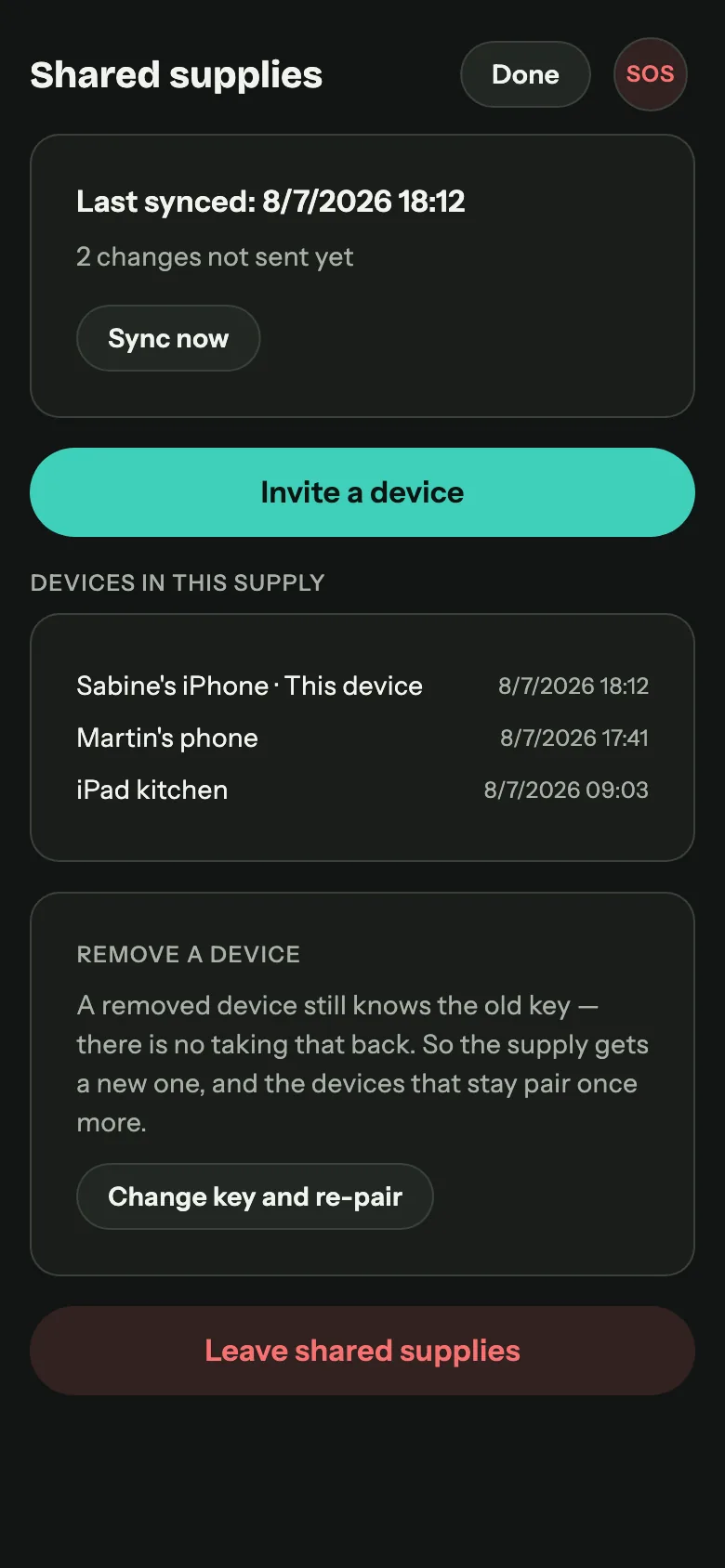
- Start from the inventory, right under the heading, and equally from settings under Data & security. The button also tells you when something is still waiting to go out.
- Pairing by QR code, screen to camera. The code is valid for ten minutes and exactly one pairing, so a photo of it is worthless afterwards. Each device gets a name that shows up next to every entry on the others.
- The whole supply comes along, not just the changes from the moment you switch it on. No export needed beforehand.
- Merge or replace. If the second device already holds a supply, Keepilo asks whether it is a second store (identical items are merged, quantities added) or the same shelf (the local stock gives way to the household's). Whether twelve cans here are the same twelve as there is not something a program can know.
- End-to-end encrypted with AES-256-GCM. The key lives in your devices' keychain and is never transmitted; the service carries sealed parcels and cannot open them. No account, no email address, just a random household identifier.
- Keep booking with no network. Nothing waits for the connection. Entries are quantity changes, so the total is right even when two people book out at the same time: two cans and three cans make five in any order.
- No background service. Syncing happens when the app opens, when the inventory opens, and every five minutes after that while the app is open. Reliable background syncing would need push notifications through Apple and Google, which have no business being here.
- The supply only. Items, batches and entries. Documents, people, health data, emergency plan and vault stay where they are.
- Removing a device means rotating the key and pairing once more. A removed device knows the old key and you cannot take that back, which is more honest than a removal that only looks like one.
- Ending it deletes what sits on the server immediately. Your supply stays on the device. It also happens by itself: if no device fetches for twelve months, the server deletes everything.
Backup, export and offline family sharing
Everything is in one file format, .keepilo, with presets that decide what goes
in: full backup, inventory only, or a sharing package that deliberately excludes or includes
health data and asks you first.
- Automatic local backup: daily, three generations kept, without the PDFs so it stays small.
- Export and import through the operating system share sheet: AirDrop, Quick Share, USB stick, email to yourself.
- Direct transfer over local Wi-Fi: the sending device opens a small local web server with a one-time token, shows a QR code, and the receiving device scans it and downloads. The token is valid for exactly one transfer and is handed over by camera, outside the network. Works on a hotspot with no internet behind it.
- "Open with Keepilo" for backup files and library documents from other apps.
- Merge rules so importing does not silently overwrite what you built.
English and German, cleanly separated
The app runs entirely in English or German, switchable in Settings. Everything follows: the interface, the backpack template, printed emergency cards, the handbook inside the app, and the language the assistant answers in. Numbers, dates and units follow the language instead of being reformatted afterwards.
Independent of that is what language your documents are in: a German question to an English manual still gets a German answer.
Platforms and layout
One codebase, three layouts, four platforms.
| Class | Width | Navigation | Detail view |
|---|---|---|---|
| Phone | under 600 dp | Bottom bar, six entries | Full screen, pushed |
| Tablet | 600-1024 dp | Icon rail on the left | Side panel |
| Desktop | over 1024 dp | Sidebar with labels | Third column |
The design system behind it is called "calm strength": warm dark surfaces, high contrast, a single petrol accent, and traffic-light colours reserved strictly for status, never decoration. Every touch target is at least 48 px.
Dark and light are equal citizens
Keepilo follows your system setting, and both modes are designed rather than derived. In light mode the accent and the status colours go a step darker so text keeps its contrast on paper; nothing is a washed-out version of the other mode.